![paiger-logo-white (1).png]](https://help.paiger.co/hs-fs/hubfs/paiger-logo-white%20(1).png?height=40&name=paiger-logo-white%20(1).png)
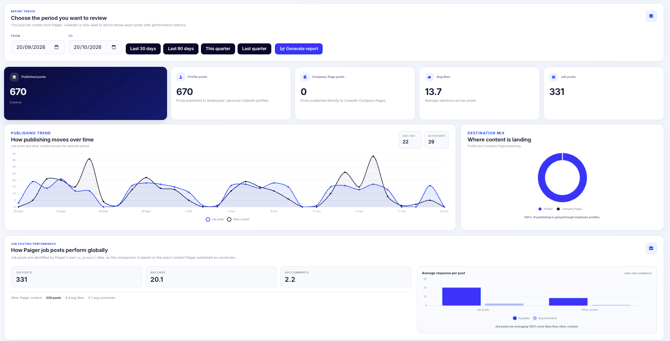
Content Performance gives administrators a global view of LinkedIn posts published through Paiger, across people, Company Pages and brands.
Find it in Paiger: Reports > Content performance
Generate a report-
Choose a From and To date, or use Last 30 days, Last 90 days, This quarter or Last quarter.
-
Select Generate report.
-
Start with the publishing summary, destination mix and job-post performance. Then scroll to the detailed post list.
What is included
The report starts with Paiger’s publication records. It does not claim to include LinkedIn posts that were published outside Paiger.
-
Published posts: LinkedIn posts Paiger recorded as published during the selected period, including personal profiles, Company Pages and Showcase Pages when applicable.
-
Job posts: posts identified by Paiger as vacancies, so you can compare their publishing volume and average likes/comments with other content.
-
Publishing trends: posting volume over time, including days on which content was published.
-
Schedule Categories: if your team uses them, the report shows existing categories and colours with their activity and available averages.
-
Post-level detail: the brand, publishing person, department, location, user tags, destination, date, content and available engagement information.
LinkedIn is used to add performance data to the matching posts. A disconnected publishing account or unavailable LinkedIn metric may mean some posts have no live engagement figures.
-
Filter by Paiger brand, Schedule Category or region, publishing destination and job/content type.
-
Use the search field to find posts, people, departments or tags.
-
Narrow the list by Department, Location or User tag; sort by newest, likes or comments.
-
Select the link on a post to open it on LinkedIn, or choose Export CSV for the selected reporting period.
The CSV export is based on the selected date range. Filters used within the on-screen table are not necessarily applied to the downloaded file.