![paiger-logo-white (1).png]](https://help.paiger.co/hs-fs/hubfs/paiger-logo-white%20(1).png?height=40&name=paiger-logo-white%20(1).png)
The Meta report gives you a consolidated place to review performance for connected Facebook Pages and Instagram accounts.
Find it in Paiger: Reports > Meta
How to view your results-
Choose Facebook or Instagram at the top of the report.
-
Select the relevant social connection and Page or Instagram account.
-
Set the date range and update the report.
-
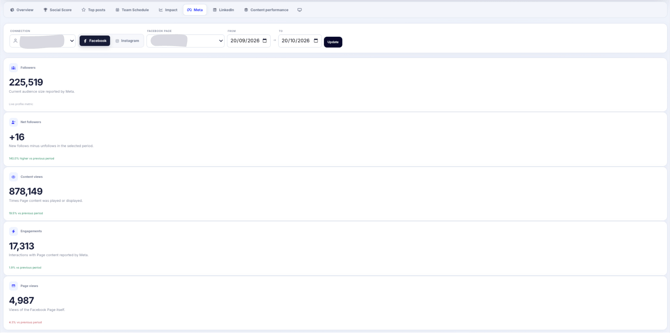
Review the headline figures, the performance trend, comparison with the previous period and the top-performing content.
What appears depends on which Meta accounts are connected, the permissions they have and what the Meta API returns.
-
Depending on the platform and available permissions, the report can show followers, follower changes, content views or reach, engagement and Page or profile activity.
-
Trend charts show activity over time. The period comparison helps you see whether key measures have risen or fallen.
-
The Top content section ranks posts by interactions during the selected period.
-
Where available, Instagram follower demographics help show which audience groups you are reaching.
Some Instagram demographics use a rolling 30-day period rather than exactly matching the date range selected.
-
Spot topics and formats that receive reactions, comments or shares, rather than focusing on follower totals alone.
-
Use changes over time to understand whether your publishing activity is improving engagement.
-
Compare Facebook and Instagram separately. The two platforms do not always define or provide metrics in exactly the same way.
If Meta does not return a metric, Paiger may leave it unavailable and show details under Meta API notes. Avoid treating missing data as zero performance.