![paiger-logo-white (1).png]](https://help.paiger.co/hs-fs/hubfs/paiger-logo-white%20(1).png?height=40&name=paiger-logo-white%20(1).png)
Usage & Impact combines Paiger activity with estimated efficiency and media value to support account reviews, adoption discussions and internal reporting.
Find it in Paiger: Reports > Impact
How to use the reportThe page is headed Usage & Impact.
-
Choose the reporting period using the report date controls.
-
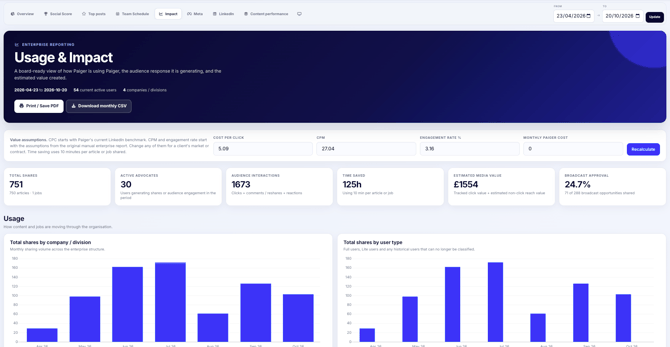
Review Total shares, Active advocates, Audience interactions, Time saved and Estimated media value.
-
Use the Usage, Engagement, Efficiency & value, User averages and Company / division summary sections to understand performance in more detail.
-
Use Print / Save PDF for a shareable report, or Download monthly CSV to analyse the figures outside Paiger.
Usage & Impact is different from Overview: Overview’s earned media value uses tracked clicks only; Usage & Impact also includes a modelled value for non-click reach.
-
Total shares: articles and jobs shared through Paiger.
-
Active advocates: people who generated shares or audience engagement during the selected period.
-
Audience interactions: tracked clicks plus social comments or reshares and reactions.
-
Time saved: estimated using 10 minutes for each article or job shared.
-
Broadcast approval: the share of broadcast opportunities accepted by recipients, when broadcasts took place.
-
Estimated media value (EMV): tracked clicks valued using a CPC assumption, plus estimated non-click impression value using an engagement-rate and CPM assumption.
-
At the top of the report, update Cost per click, CPM or Engagement rate % to reflect your own market benchmarks.
-
Optionally enter the Monthly Paiger cost, then select Recalculate.
-
When monthly cost is supplied, the report displays an EMV return multiple: estimated media value divided by the Paiger cost over the reporting period. It is not a financial ROI calculation.
Monthly cost is optional. Without it, the EMV return figure is not shown.
-
The usage and tracked engagement figures are based on recorded Paiger activity. Reach and earned media value are estimates based on your selected assumptions.
-
Historical user-level impressions are not stored for this report, so estimated reach is not the same as measured impressions.
The report does not measure placements, pipeline or recruitment revenue and should not be used as proof of commercial return by itself.