![paiger-logo-white (1).png]](https://help.paiger.co/hs-fs/hubfs/paiger-logo-white%20(1).png?height=40&name=paiger-logo-white%20(1).png)
The Paiger Bullhorn integration is currently in Beta and is subject to change
To request a Paiger Bullhorn integration, please email support@paiger.co
Prerequisites
- An active Bullhorn account
Step 1: Bullhorn OAuth Configuration
Your Bullhorn administrator will need to send the following to Bullhorn Support AND CC IN support@paiger.co
|
Hello, We are looking to set up the Paiger integration with our Bullhorn account. Company Name: [Client to complete] Please could you provide the following credentials for the Paiger integration:
We also require the following redirect URL to be configured: https://crm.content-app.com/bullhorn_oauth_callback Please let us know once these have been set up and the credentials are available. Thanks, |
support@paiger.co MUST be in cc'd
Step 2: Connecting Your Account
- Await the go-ahead from our support team
- Log into your Paiger account
- Navigate to your name (top right), then Integrations from the drop down
- Select Bullhorn from the integration screen
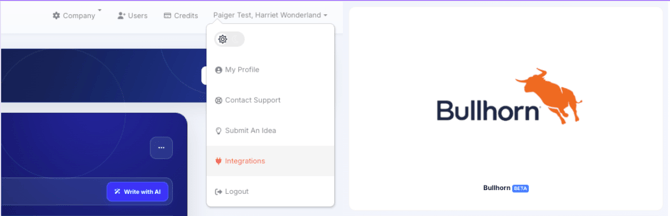
- Click "To connect your account to Bullhorn, please click here"

- In the new window, enter your Bullhorn credentials when prompted
- You are all connected and ready to go.
What You Can Do Once Connected
- Search for candidates in your Bullhorn database from Paiger
- Search and import Bullhorn CVs through My Candidates
- Export templated CVs from Paiger to Bullhorn - direct to a candidate record
- Add notes to Bullhorn (customisable) for reporting in Bullhorn analytics (request this through support@paiger.co).
Security Information
We take your data security seriously:
- We never store or have access to your Bullhorn password
- Authentication happens securely through Bullhorn's OAuth system
- Your connection can be disabled at any time.
Need Help?
If you encounter any issues connecting your accounts, please contact our support team at support@paiger.co.